Every year, crores of eligible Indian families miss out on free hospital treatment up to ₹5 lakh simply because they don’t know how to access their Ayushman Bharat benefits. If you or your family members are eligible under PM-JAY, this complete guide will walk you through every step—from logging into the Beneficiary NHA Portal to downloading your Ayushman Card—in simple, straightforward language.
PMJAY Beneficiary Login 2026: Complete Step-by-Step Guide
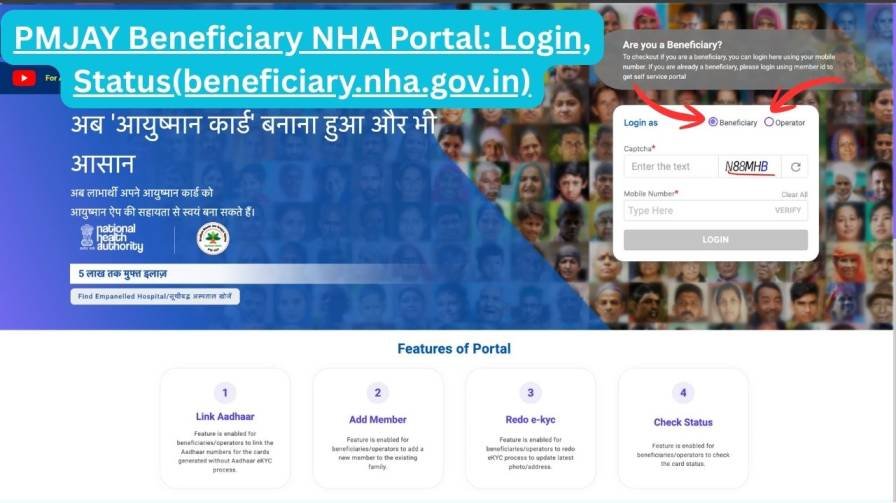
Step 1: Open the Official Portal
Open your preferred browser and navigate to: https://beneficiary.nha.gov.in
Step 2: Select “Beneficiary” Login Mode
On the homepage, you’ll see two login options:
- Beneficiary – For citizens and families (self-service)
- Operator – For hospital staff and Arogya Mitras
Click on “Beneficiary” to proceed with self-service access.
Step 3: Mobile Number Verification
- Enter your 10-digit registered mobile number
- Click the “Verify” button
- Select “OTP” as authentication method
- Enter the 6-digit OTP received via SMS
- Click “Verify OTP” to continue
💡 Pro Tip: OTPs expire within 3-5 minutes. Keep your phone handy before clicking “Verify.”
Step 4: Search Your Family Records
After successful OTP verification, a search page appears. Fill in these details:
| Field | What to Select/Enter |
|---|---|
| Scheme Name | PMJAY (or your state’s linked scheme) |
| State | Your registered state |
| Sub-Scheme | Select if applicable |
| District | Your home district |
| Search By | Family ID / Aadhaar / Mobile / Name / Ration Card |
| Search Value | Enter the corresponding information |
Click “Search” to proceed.
Step 5: Access Your Beneficiary Dashboard
Your family’s details will appear on screen. Click on your family name to open your personal beneficiary dashboard, where you can view:
- Eligibility status
- Family members covered
- Ayushman Card status
- e-KYC completion status
- Available benefits
- Hospital visit history
How to Check PMJAY Beneficiary Status Online (2026 Updated Method)
Checking whether your name appears in the PM-JAY beneficiary list is the most common reason people visit this portal. Here’s exactly how:
- Log in to beneficiary.nha.gov.in using steps above
- Navigate to your dashboard
- Look for the “Beneficiary Status” section
- Your status displays as:
- Active – Ready to avail benefits
- Eligible – Verified but card pending
- Pending – Under verification
- Inactive – Not currently eligible
The dashboard also lists all family members covered under your card with their individual status.
✅ If your status shows “Active,” you can immediately avail cashless treatment at any empanelled hospital.
5 Alternative Ways to Check PMJAY Beneficiary List
Not comfortable with the online portal? Use these alternative methods:
1. Ayushman Bharat Mobile App
Download the official NHA app from:
- Google Play Store (Android)
- Apple App Store (iOS)
The app offers all portal functions optimized for mobile use, including voice search in regional languages.
2. Common Service Centre (CSC)
Visit your nearest CSC with your Aadhaar card. The trained operator will check your eligibility for free (nominal service charges may apply for printouts).
3. PMJAY Helpline
Call these toll-free numbers:
- 14555 (24×7 helpline)
- 1800-111-565 (alternate number)
Helpline executives can verify your status over the phone using your basic details.
4. District NHA Office
Visit your district-level NHA office or ask for the Ayushman Mitra at the nearest government hospital for in-person verification.
5. SMS Service
Send an SMS to 14555 or 56677 with your:
- Aadhaar number, OR
- Ration card number, OR
- Registered mobile number
PMJAY Operator Login & CSC Login Explained
Option A: Hospital Operator / Arogya Mitra Login
Hospital staff use the dedicated operator login on the same portal:
- Visit beneficiary.nha.gov.in
- Select “Operator” radio button
- Enter official operator credentials (provided by NHA)
- Complete OTP verification
- Access the Beneficiary Identification System (BIS) to:
- Verify patient eligibility before admission
- Process pre-authorization requests
- Submit and track claims
- Generate treatment approvals
Option B: CSC / VLE Operator Login via Digital Seva Portal
Common Service Centre operators follow a different process:
Step 1: Go to digitalseva.csc.gov.in
Step 2: Log in using your:
- Official CSC ID/Username
- Password
- CAPTCHA or OTP (if prompted)
Step 3: From the Digital Seva dashboard, search for “Ayushman” or “PMJAY” in the service menu
Step 4: You’ll be redirected to the BIS Portal (bis.pmjay.gov.in) . Enter your CSC credentials again
Step 5: Now you can assist beneficiaries with:
- New PM-JAY registrations
- Ayushman e-Card downloads
- e-KYC processing and updates
- Eligibility verification
- Grievance registration and tracking
- Family member additions
New Features on Beneficiary NHA Portal (2026 Updates)
The portal has been significantly upgraded for 2026. Here’s what’s new:
1. AI-Powered Eligibility Pre-Screening
Before logging in, the portal now offers an AI chatbot that asks simple questions to determine likely eligibility—saving time for both beneficiaries and operators.
2. Voice Search in 22 Languages
Type no more. Use voice commands in your preferred language to search for family records, hospitals, or scheme details.
3. DigiLocker Integration
Documents can now be fetched automatically from DigiLocker during e-KYC. No more uploading scanned copies.
4. Biometric Aadhaar Authentication
For enhanced security, biometric authentication (fingerprint/iris) is now supported directly through the portal for high-value transactions.
5. Real-Time Application Tracking
Track the status of:
- New member addition requests
- e-KYC updates
- Card generation
- Grievance resolution
Each application now comes with estimated resolution timelines and SMS alerts.
6. GIS-Based Hospital Locator
Find the nearest empanelled hospital with an interactive map showing:
- Distance from your location
- Specialties available
- Bed availability (where integrated)
- Contact numbers and directions
7. ABHA Integration
Connect your PM-JAY records with your Ayushman Bharat Health Account (ABHA) to create a unified digital health record combining insurance coverage with medical history.
8. Grievance Redressal Dashboard
Lodge complaints directly through the portal and track resolution status without calling any helpline.
Portal Features at a Glance
| Feature | Details |
|---|---|
| Official Website | beneficiary.nha.gov.in |
| Managed By | National Health Authority (NHA), Govt. of India |
| Primary Scheme | Ayushman Bharat PM-JAY |
| Annual Coverage | ₹5 lakh per family per year (secondary & tertiary care) |
| Coverage Type | Cashless, paperless treatment |
| Login Modes | Beneficiary / CSC Operator / Hospital Operator |
| Search Options | Aadhaar, Family ID, Mobile, Ration Card, ABHA ID, Name |
| Helpline Numbers | 14555 or 1800-111-565 |
| Languages Supported | 22 scheduled Indian languages (including Hindi, Bengali, Tamil, Telugu, Kannada, Gujarati, Marathi) |
| Mobile App | Ayushman Bharat App (Android & iOS) |
| New in 2026 | AI pre-screening, voice search, DigiLocker integration, biometric auth |
How to Download Ayushman Card from Beneficiary Portal
Once logged into your dashboard:
- Look for “Download e-Card” or “Ayushman Card“ section
- Select family member whose card you need
- Click “Generate Card” or “Download”
- Card opens as PDF – save or print immediately
- Card remains valid for the entire coverage period
📱 Mobile App Alternative: Open Ayushman Bharat App → Login → Go to “My Card” → Download PDF
Frequently Asked Questions (FAQs)
Q1: What is the official Beneficiary NHA Portal website?
A: The only official website is beneficiary.nha.gov.in. Do not trust third-party websites claiming to offer Ayushman Card downloads.
Q2: Can I check PMJAY status without Aadhaar?
A: Yes. Use your:
- Ration Card number (linked to SECC data)
- Registered mobile number
- Family ID (if available)
Q3: Is the portal free for citizens?
A: Absolutely free. CSC operators may charge nominal fees for assisted services, but self-service on the portal costs nothing.
Q4: What is PMJAY CSC login?
A: It’s the login used by Common Service Centre operators (government-authorized village-level entrepreneurs) who help citizens access PM-JAY services through the Digital Seva Portal.
Q5: Is the Ayushman Bharat app available for iPhone?
A: Yes. Available on both Google Play Store (Android) and Apple App Store (iOS).
Q6: Can I check state health schemes on this portal?
A: Yes. The NHA portal is integrated with many state-specific health sub-schemes. Select your state and relevant scheme from dropdown during search.
Q7: What languages does the portal support?
A: All 22 scheduled Indian languages, including Hindi, Bengali, Tamil, Telugu, Kannada, Gujarati, Marathi, Punjabi, Odia, Assamese, and more.
Q8: How do I add a new family member?
A: Login → Dashboard → “Add Member” option → Upload documents (birth certificate/marriage certificate) → Submit for approval → Track status in real-time.
Q9: What if my Ayushman Card is lost?
A: Simply log in and download a fresh e-card. It’s instantly available and valid immediately.
Q10: Can I use the portal on mobile?
A: Yes, the portal is mobile-responsive. For better experience, download the Ayushman Bharat App.